Review Comments (0) Screenshots (6) Questions & Answers (0) Votes (0) Awards (8) Wiki  
Joboshare
3.1.9
www.joboshare.com
Shareware
$28.00  Purchase
8 people
Download Joboshare DVD to...

5.8 MBDownloaded 128 times

This software was checked for viruses 6 months ago and was found to contain no viruses.
Click here to see antivirus report.
 
Video tutorial for Joboshare DVD to 3GP Converter 3.1
Frame

Review

This is official description

Joboshare DVD to 3GP Converter, powerful DVD to 3GP converter, can fast rip and convert DVD to 3GP, 3G2, MP4, MOV, AVI video formats and convert DVD to MP3, WAV, M4A, AAC audio formats for playing on popular mobile phones like Motorola, Nokia, Samsung, BlackBerry, Sony Ericsson, LG, etc.
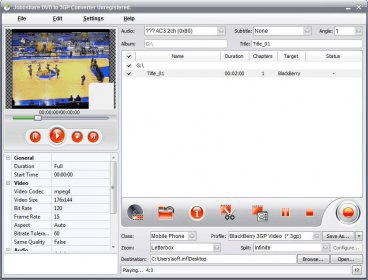
Joboshare DVD to 3GP Converter is developed with various options which help you rip any selected DVD chapters or titles, select target subtitle and audio track, adjust bit rate, customize file size, and split file.
 
The following review written by one of the Software Informer contributors applies to version 2.6

Joboshare DVD to 3GP Converter is much more than just a video conversion tool to create 3GP containers from any video DVD. Actually, this application is a comprehensive audio extractor and video encoder that supports more than 20 of the most widely used multimedia formats. Just to name a few, this tool allows saving the audio of any of the soundtracks in the DVD in MP3, WAV, AC3, Ogg, or WMA. Conversion to video offers an even larger list of possibilities – from standard AVI, MPEG, and WMV, to specific profiles for iPod, iPhone, Windows Mobile, Archos, iRiver, Zune, Creative Zen, or Blackberry.

The program smartly combines a wide selection of format and quality presets with the possibility of selecting specific values for every parameter available. This certainly makes this comprehensive tool suitable for all types of users. Its interface is clear and well-structured, and most of the buttons available are self-explanatory. Everything you need is out there in the main interface – with just a few pull-down menus, the program offers you all the main functionality you need to make your choice. Instead of showing you a long list of hard-to-understand presets, the profiles menu is divided into seven device-related categories which will make it easier for you to narrow your search. Once you have selected a profile, the program will show you the main audio and video parameters to be used, giving you the opportunity of changing any of the default values, such as the audio sample rate, audio and video bit rates, the frame rate, the size of the video, etc.

Finally, it is important to note that the program can automatically convert either the whole DVD or just the parts you have selected, down to the individual chapters within each title. Likewise, the soundtrack, the subtitle stream, and the angle are also selectable (when more than one exists).

Thus, this efficient video converter and audio extractor proves that flexibility and simplicity are not always incompatible.
  • Large selection of device-oriented conversion profiles.
  • Clear and self-explanatory interface.
  • Supports audio extraction in various formats.
  • None.

Reviewed by: Francisco Javier Martínez Calvo

Reviewer rating:

Reviewed: Last year

Report a wrong version Report a wrong program title Suggest a correction

Screenshots

Main window Main window Main window Main window Main Interface Main Interface Selecting Chapters Selecting Chapters
All 6 screenshots

Latest comments


There are no comments, be the first one!
Add new comment

E-mail Address:

Password:

Register now »

Forgot password?

Sign in with:
Download Software Informer Client
Copyright © 2012, Informer Technologies, Inc. About| Privacy and terms| Help| Feedback & Support| Partners program